

Accommodation
How to build stays, hotels and rooms in a proposal, including board basis, room types and per-night pricing.
Use the Accommodation tab for everywhere the client sleeps. Accommodation is built in three levels: a stay (a place and a period), hotels inside it (the options you propose) and rooms inside each hotel.
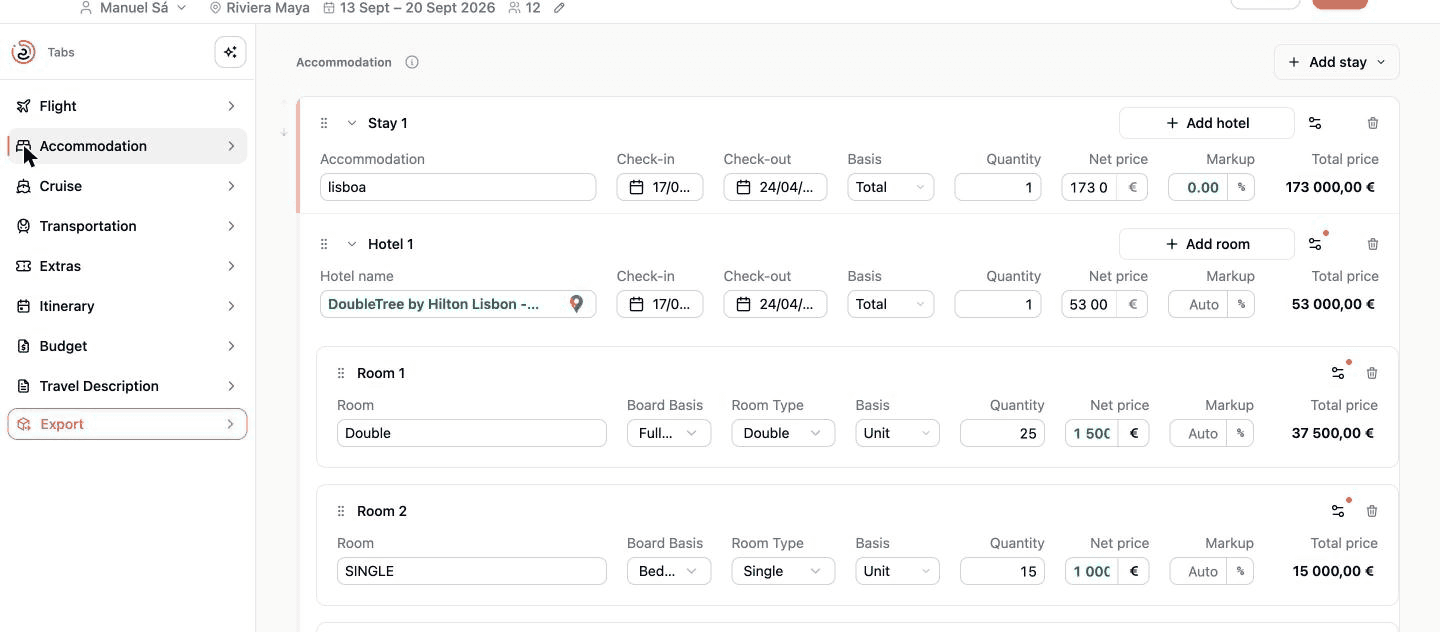
How The Levels Work
| Level | Represents | Example |
|---|---|---|
| Stay | One place and one period | "Lisbon, 17 to 24 April" |
| Hotel | A property you propose for that stay | "DoubleTree by Hilton Lisbon" |
| Room | A room type booked at that hotel | "Double, Full Board, 25 rooms" |
Add several hotels to one stay to offer alternatives, for example a 4-star and a 5-star hotel for the same dates. The client chooses one, and the budget can show them as alternatives.
Building A Stay
Add the stay
Click Add stay. Name it (the Accommodation field) and set Check-in and Check-out. The check-out date must be on or after check-in.
Add a hotel
Click Add hotel. Enter the Hotel name, and the dates if they differ from the stay. A stay needs at least one hotel.
Add the rooms
Click Add room inside a hotel. For each room set:
| Field | Notes |
|---|---|
| Room | A label, for example Double or Ocean view |
| Board Basis | The meals included, see the table below |
| Room Type | The kind of room, see the list below |
| Basis | How the price is calculated, see Pricing |
| Quantity | Rooms, guests or units, depending on the basis |
| Net price and Markup | What you pay, and your profit |
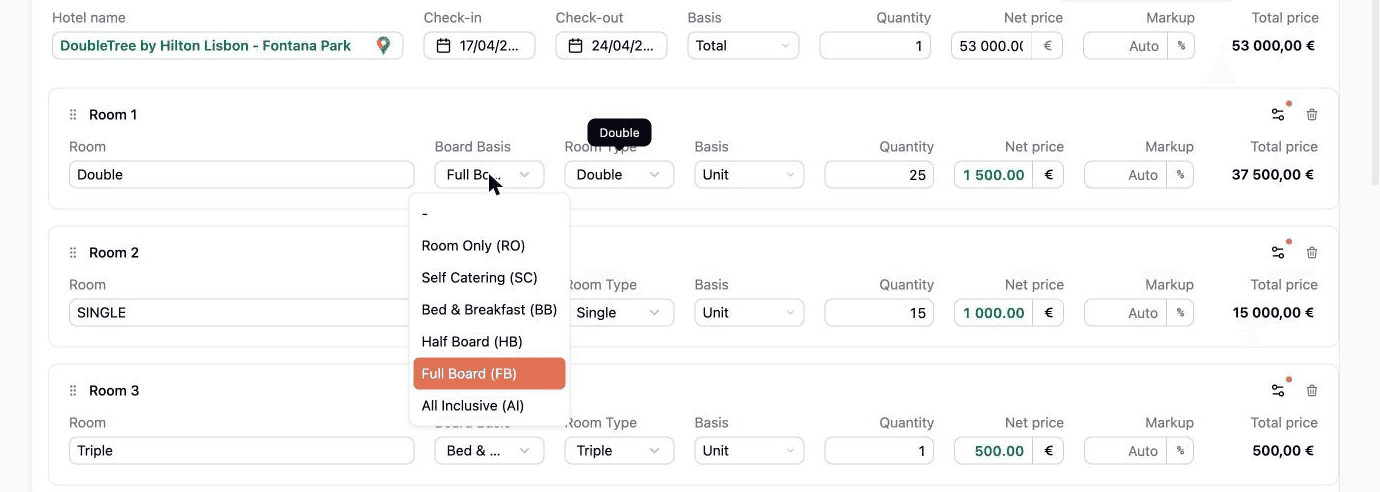
Board basis
| Board basis | Meaning |
|---|---|
| Room Only (RO) | Accommodation with no meals |
| Self Catering (SC) | No meals, with a kitchen or similar |
| Bed & Breakfast (BB) | Breakfast included |
| Half Board (HB) | Breakfast and one other meal |
| Full Board (FB) | All three meals |
| All Inclusive (AI) | Meals, snacks and drinks |
Room types
Single, Double, Twin, Twin/Double, Triple, Quadruple, Family, Suite, Studio, Apartment, Dormitory Room, Bed in Dormitory, Bungalow, Chalet, Villa, Holiday Home, Mobile Home and Tent.
Pricing
Stays, hotels and rooms can each carry a price. Because the dates are known, all four Basis modes are available:
| Basis | Total | Example |
|---|---|---|
| Total | The price as entered | A villa package for the whole stay: €4,000 |
| Unit | Price × quantity | 3 rooms at €500 each: €1,500 |
| Total / night | Price × nights | A villa at €800 a night for 5 nights: €4,000 |
| Unit / night | Price × quantity × nights | 3 rooms at €150 for 4 nights: 150 × 3 × 4 = €1,800 |
A price on a parent (stay or hotel) overrides the rooms below it. Leave the parent's net price on Auto to let the rooms add up. See Budget basics.
Nuances
Common Mistakes
- Using Unit instead of Unit / night for a per-night rate, which prices one night.
- Setting a price on both the hotel and its rooms. The hotel's price wins and the rooms are locked.
- Leaving the check-out date empty, which disables per-night pricing.
What The Client Sees
Hotels appear with name, dates, rooms and board basis in the website, the email and the PowerPoint. Each hotel can have images chosen in the Export panel, see Export panel.