

Flights
How to build flight options in a proposal: groups, segments and legs, pricing, and the nuances of overnight and internal flights.
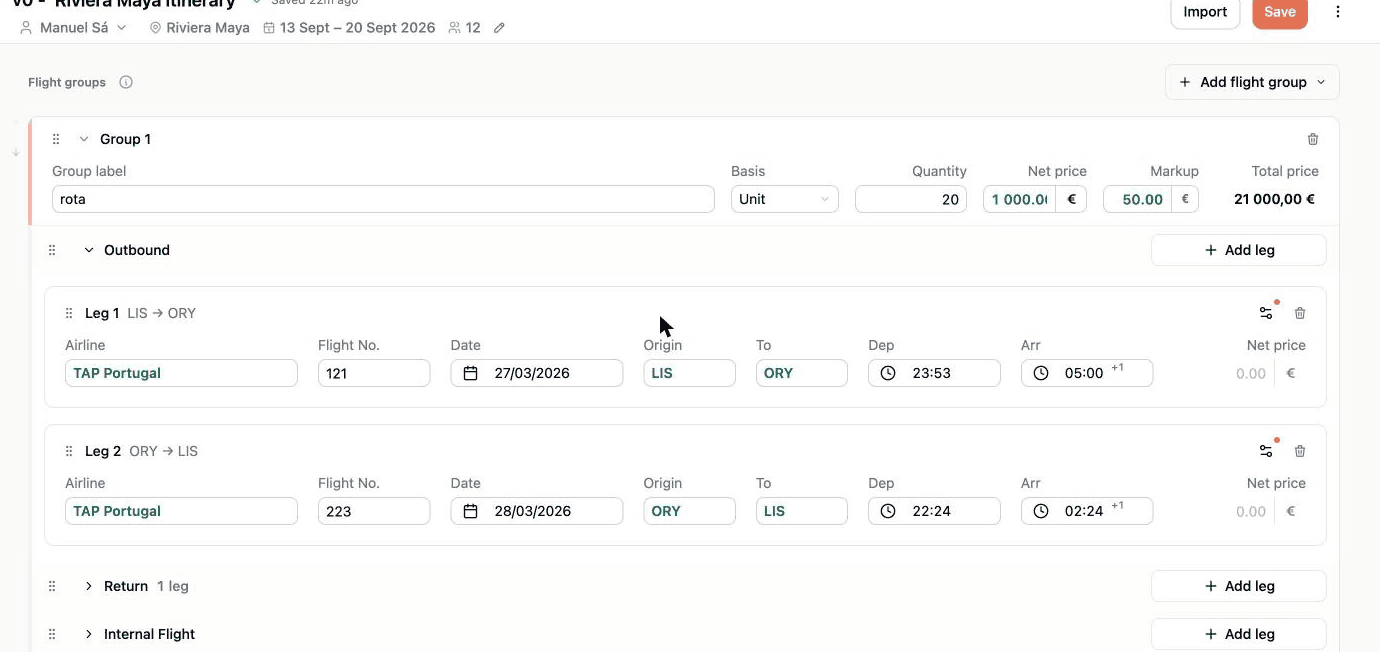
Use the Flight tab for airline tickets. Flights are built in three levels: a flight group (one complete option, with one price), segments inside it (outbound, return, internal) and legs inside each segment (one actual flight).
When To Use A Group
A flight group is one complete package the client could buy. Create one group for each option:
- Direct versus connecting itinerary.
- Economy versus business.
- Two different airlines for the same dates.
A single journey with several flights, such as Lisbon to Paris to Tokyo and back, is one group with several legs, not several groups.
Building A Flight Group
Add the group
Click Add flight group. To bring flights in from a Galileo terminal instead of typing them, see Import documents.
Name and price the group
- Group label: a short name, for example the route.
- Basis: Unit if the price is per traveller, Total if it is one price for everyone.
- Quantity: how many travellers the price covers. With Unit and quantity 20, a net price of 1,000 becomes 20,000.
- Net price and Markup: what you pay and what you add. Total price is calculated.
Fill in the segments
Each group has the segments Outbound, Return and Internal Flight. A segment shows how many legs it holds (for example Return, 1 leg). Open one with its arrow.
Add the legs
Inside a segment, click Add leg for every flight. Fill in:
| Field | Notes |
|---|---|
| Airline | The carrier, for example TAP Portugal |
| Flight No. | The flight number |
| Date | The departure date |
| Origin and To | Airport codes, for example LIS and ORY |
| Dep and Arr | Local departure and arrival times |
| Net price | Optional: a price for this leg alone |
The leg's title updates to the route, for example Leg 1 LIS → ORY.
Reorder or remove
Drag a group, segment or leg by its handle, or use Move up and Move down. Remove group deletes a whole group.
Nuances
Common Mistakes
- One group per flight. This splits one journey into several priced options. Use one group with several legs.
- Forgetting the quantity. With Unit basis the total is the price times the quantity: a quantity of 1 prices one traveller.
- Typing the price twice. If both the group and its legs have prices, the group's price takes over and the legs are locked.
What The Client Sees
The flights appear in the website, the email and the PowerPoint with airline, flight number, route and times. See the Export panel.